

Share with your friends!

Share with your friends!
With Google Ads, you can run a variety of adverts across a vast advertising network that consistently demonstrates its potential to deliver outstanding results. As well as Search and Shopping adverts, you can also use display adverts, which we’ll look at in more detail below.
Display ad formats are frequently used in affiliate marketing and are served on Google’s advertising network in accordance with certain advertising policies. The banners can be individually adapted to all end-user devices (desktop and mobile), which offers a significant advantage over static adverts. In addition to static text banners, it is also possible to run animated banners.
Once you have decided to use Google Ads banners, it is advisable to identify the most effective advertising options and formats for your business. To this end, we explain the following aspects:
With banner adverts via Google Ads, you can showcase your business, a product or a brand on thematically related pages, as well as on websites visited by your target audience. A range of targeting options and banner formats help you tailor your advertising specifically to target audiences, devices and pages.
Essentially, the choice of Google Ad banners is limited to a specific selection. These are predefined in terms of shape, aspect ratio and (in some cases) positioning. You will also need to decide whether you wish to run image adverts or animated banners.
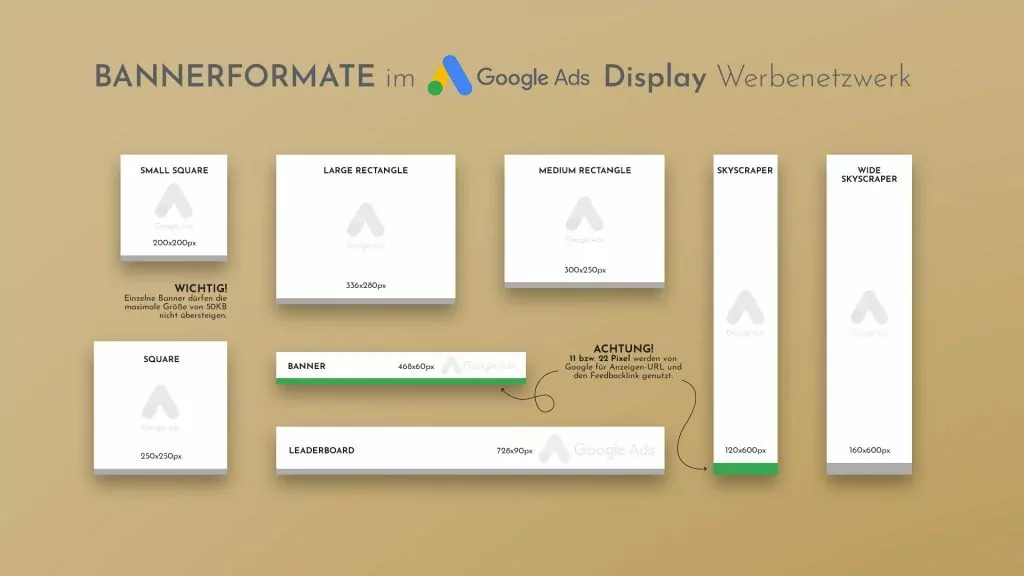
The following diagram shows the banner formats that are available:
Permitted banner sizes (Source: adseed.de)
In addition, special formats allow you to choose from a range of other display options:
The choice of banner size or format depends on several targeting factors.
Example: Whilst large-format adverts can be effective on desktops and laptops, smaller banners are more suitable for display on mobile devices and in apps. Factors such as the browser, operating system and cultural context are also relevant.
The list below sets out the most important formats for remarketing banners which, in our experience, perform particularly well in German-speaking countries (all dimensions are given in pixels and based on 72 dpi):
300 x 250 pixels: This format is suitable if you only want to create a single banner.
320 x 50 pixels: This is a suitable format for mobile advertising, which is also used in apps.
728 x 90 pixels: Our experience is consistent with the findings of studies (LINK to the GDN case study available) which show that this format works particularly well in combination with 300 x 250 pixel banners when two banners are to be displayed.
468 x 60 pixels: This format is popular on older websites. However, its usage is steadily declining.
If you are looking for ways to expand into other European countries, Google Ad banner formats offer you the option of displaying product-relevant content tailored to your target audience. We have selected four countries as examples where specific banner formats are effective:
One of the most common questions when choosing banner formats is which one is the most effective. The answer depends primarily on three factors:
Last but not least, it is important to clarify on which pages a Google Ads banner should be displayed. On your own pages, there are virtually no limits to your choice. If external website operators are involved, they usually specify the banner placements and sizes.
What do you hope to achieve with the banner, and when(!) should it catch the eye of a website visitor? If it is important to you to attract attention and direct the user to your offering right at the start of their visit to the website, placing a Google Ads banner in the header of a page may be a sensible option.
If your aim is to provide information FIRST and THEN present the offer, you should choose a position outside the header area.
Let’s look at a few specific examples:
Leaderboard banners (728 x 90 pixels) are ideal if you want your banner to be visible to the user ‘above the fold’ as soon as a page loads. This area is visible without scrolling and, from a conversion perspective, is the most effective. For this reason, we recommend filling this area of a website exclusively with relevant content. In the majority of our campaigns, we have found that, in many cases, users do not scroll but decide at a glance whether to stay on a page.
If your aim is primarily to advertise on mobile devices, we recommend Google Ads banners in the 320 x 50 or 300 x 250-pixel formats. Another advantage of this is the predictability of the budget: if you decide on an advertising option at an early stage, the graphic designer won’t have to create separate adverts for each format. This saves financial resources, which can then be allocated according to the reach and frequency of the advertising.
Depending on how widely dispersed a target audience is, it may make sense to set up a broad-reaching campaign. The more banner formats you use, the more frequently and on the greater number of pages they will be displayed to your potential customers. However, even here, effectiveness trumps efficiency: you should use the right banners, rather than using all banners correctly. It is important to avoid wastage so that, when evaluating the campaign, you can identify more precisely which formats will remain effective in future and why others do not lead to the desired conversion.
Our experience and the analysis of customer reports show that, regardless of the file format used for Google Ads banners (whether image adverts or animated .GIFs), the same formats are consistently the most effective.
If, as with a placement campaign, the aim is to maximise reach, the following formats are the most effective:
Banners in the 320 x 50, 728 x 90, 300 x 250, 160 x 600 and 468 x 60 pixel formats generate the most impressions (the number of times a banner appears on a page). Only one of these (320 x 50) is specifically designed for mobile devices, so we can wholeheartedly recommend the other four formats for generating reach. The 320 x 50 format can be used in a separate campaign for mobile devices, provided this fits with the campaign strategy.
Please bear in mind that it is not uncommon for banners in apps to be clicked on ‘by mistake’, resulting in a higher impression rate. This can be beneficial for branding campaigns. For conversion-focused campaigns, however, it is detrimental, as it is not possible to determine precisely why the user does not take ‘the final step’ (i.e. making contact or making a purchase).
The format’s wide reach on mobile devices should come as no surprise; after all, since the end of 2016, more people have been accessing the internet via a mobile device than via a desktop PC.
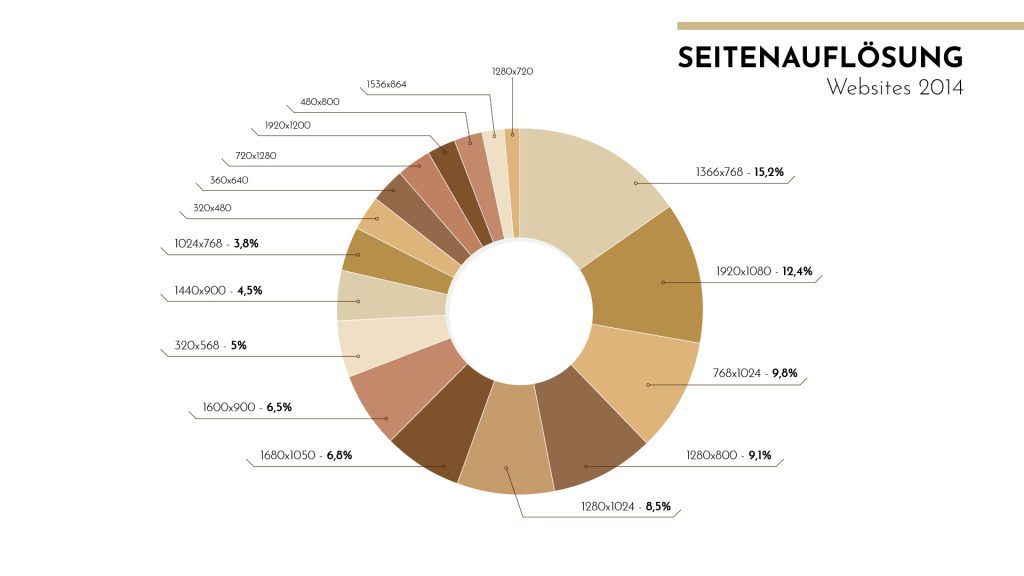
However, the high reach of the other formats can also be explained: it is crucial to consider which browsers are the most popular and which page and resolution ratios are most commonly used.
The majority of advertising-relevant websites use AdSense to display Google Ads banners, with content dimensions ranging from 900 to 1,300 pixels in width.
The advertising areas are structured as follows: at the top and bottom respectively are the header and footer areas, in which banners in the formats 468 x 60 and 728 x 90 pixels are used. Experience shows that the 300 x 250 or 160 x 600-pixel formats are often used in the navigation area or sidebar, which is positioned to the left or right of the main content.
Once you have decided whether you would prefer to appear at the top of the page straight away, or whether you might prefer to be displayed in the sidebar for a longer period. We recommend animations for headers and footers; static banners are more suitable for sidebars or, more generally, sections of the page that remain in view for longer.
With Display Ad Builder, Google’s AdWords system offers a tool for creating image adverts quickly and (relatively) easily. With just a few clicks, you can choose from a range of banner templates in various categories and create a customised banner.
This tool is ideal for those who wish to work independently. An image advert in your corporate design, matching your website, does more than simply enhance the banner itself. It creates brand recognition, which, as experience shows, has a positive effect on user behaviour. Furthermore, the image adverts from the Ad Builder offer a good way to check whether the selected formats are appealing or even provide an alternative to self-designed adverts.
Content displayed via Google Ads must, for example, be suitable for all ages and must not exceed a file size of 150 kb. The only permitted file types are .JPEG, .JPG, .PNG and .GIF. Furthermore, for mobile image adverts, the landing page code must be programmed for mobile devices.
Animated banners in .GIF format must not exceed an animation duration of 30 seconds. Furthermore, a maximum frame rate of 5 FPS (frames per second) is required. If the animations are set to loop, they must still stop after 30 seconds.
Under certain circumstances, banners may also be rejected:
However, anyone who consistently adheres to these exclusions will be on the safe side and is highly likely to be reported.
To continue to benefit from Google Ads banners and image adverts in the long term, you should keep them up to date and adapt them to new conditions. Over the coming months and years, the most effective formats will change as new technologies come onto the market, such as new smartphone or tablet formats. The usage behaviour of a target audience may also change, which may make new banner formats necessary. In addition, annual trends should be monitored that affect graphic design, typography and visual elements. This means that banner images become outdated and, to remain effective in the long term, must be updated and adapted.