

Share with your friends!


Share with your friends!
By 2025, Klarna will be one of the most popular payment providers for online shops, and it’s incredibly easy to set up with Shopify Payments. So if you’re thinking about setting up Klarna for your Shopify shop, you’ve come to the right place. Here, I’ll show you how to integrate Klarna into Shopify. But first, let’s look at the benefits of Klarna.
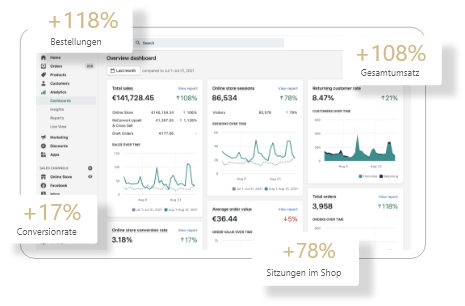
One of the main reasons for abandoned carts during the checkout process is an insufficient range of payment options. To keep your conversion rate as high as possible, you should offer as many payment options as possible.
If you’re still not convinced, you can take a look at your Shopify dashboard. If your cart abandonment rate after checkout is higher than 30 per cent, it could be down to a lack of payment options.
Klarna offers flexible payment options; as well as instant payment, it also offers payment on account and instalment plans. The ‘pay later’ option, in particular, is very much in keeping with the spirit of the times. Thanks to this flexibility, there is nothing to stand in the way of instant consumption.
But this also carries risks; in the past, retailers had to worry about getting paid when they offered purchase on account. Today, Klarna, as a third-party provider, takes care of collecting the money. As a Shopify retailer, you receive the money straight away.
| Payment method | Description | Target audience | Advantages |
| Klarna Pay Later | Buy now, pay 14–30 days later (interest-free). | Customers who would prefer to pay at a later date. | Interest-free, no immediate charge. |
| Klarna Slice It | Monthly instalments for larger amounts. | Customers who wish to pay for large purchases in instalments. | Payment by instalments for more expensive products. |
| Klarna Pay Now | Direct payment by bank transfer, card or direct debit. | Customers who want to pay straight away and without any hassle. | Instant payment for a smooth payment process. |
| Klarna Financing | Flexible financing over a longer period, often with interest. | Customers who want longer and more flexible instalments. | Flexible repayment terms encourage people to buy. |
If you set up Klarna with Shopify Payments, there are no additional charges. You simply pay the Shopify Payments fee. So there’s no reason not to set up this payment method.
Klarna does, however, come with certain drawbacks. As Klarna bears the full risk, it employs a strict fraud protection process, which is why customer applications are frequently declined.
Furthermore, the payment process is very lengthy and requires the customer to provide a great deal of information. Both of these factors can have a negative impact on the conversion rate.
Klarna availability:
Make sure you are in a country where Klarna is supported by Shopify Payments. Supported countries include, for example, Germany, Sweden, Austria, Finland, Norway and several other European countries.
Enable Shopify Payments:
To use Klarna, Shopify Payments must be enabled. This is Shopify’s payment provider, which integrates Klarna as a payment option.
1. Go to ‘Settings’ in your Shopify admin:
Go to the ‘Payments’ menu item.
2. Select ‘Set up Shopify Payments’:
If you haven’t enabled Shopify Payments yet, click the ‘Set up Shopify Payments’ button. Follow the instructions to link your account and enter details such as your bank details and tax information.
1. Go to the payment methods in Shopify Payments:
Once Shopify Payments has been set up, you’ll find a list of supported payment methods.
2. Enable Klarna payment methods:
Enable Klarna by selecting it from the options provided. Here, you can choose from various Klarna payment methods, such as Pay Later, Pay Now or Slice It (instalments).
To integrate Klarna into your Shopify shop, you must meet certain requirements as a merchant:
Please note: Klarna reserves the right to carry out individual checks on merchants before making Klarna payment methods available in the shop. This may involve a credit check or verification of the company’s registration.
1. Place a test order:
Once Klarna has been activated, you should place a test order at the checkout to ensure that Klarna appears as a payment option.
2. Check the checkout:
Check that Klarna is working properly at checkout and that transactions are being processed correctly.
Every Shopify shop is different, which is why it is not possible to make a definitive recommendation regarding Klarna. Personally, I’m a fan of offering as many payment methods as possible. At the same time, the checkout process should be as seamless as possible. A trial should help you determine whether Klarna is worthwhile for your e-commerce shop.
If you need help integrating Klarna, or if you encounter any other issues, please feel free to contact us at any time. We are a Shopify agency and help e-commerce retailers successfully scale their shops.
Want to find out more? In our comprehensive guide, you’ll find everything you need to know about setup, design, marketing, checkout, SEO and scaling with Shopify.
Klarna is a good choice for Shopify if you want to offer your customers flexible payment methods such as ‘buy on account’ or ‘pay in instalments’. These payment options can boost your conversion rate, as many shoppers prefer to pay only after receiving their goods. For you as a merchant, Klarna takes on the risk and handles the payment processing. However, you should bear in mind that Klarna – like other payment providers – charges fees which may affect your profit margin.
Yes, Klarna is available on Shopify. You can enable Klarna in your shop via Shopify Payments, provided it is supported in your country. Once Klarna is enabled, your customers will see options such as ‘Invoice’, ‘Instalments’ or ‘Instant Bank Transfer’ at checkout. This means Klarna complements standard payment methods such as credit card or Shop Pay, making your checkout process more flexible.
Klarna is a payment service provider that enables shoppers to shop online and choose flexible payment options. Klarna integrates seamlessly with Shopify Payments, so you can offer your customers the option to buy on account or pay in instalments. This payment method boosts customer satisfaction and can help increase sales in your online shop.
To enable Klarna in your Shopify shop, you first need to create an account with Klarna and complete the sign-up process there. You can then add Klarna in your Shopify Payments settings. You can find this step-by-step guide in the Shopify documentation.
The fees for using Klarna depend on your turnover and the relevant payment volume. Generally speaking, the Klarna fee is a certain percentage of the total transaction amount. It is important to review the fees in advance and, if necessary, clarify them with your Klarna contact.
Klarna offers a wide range of benefits for online shop owners. By integrating Klarna, you can positively influence your customers’ purchasing behaviour, as they have the flexibility to choose how they make their payments. Furthermore, customers are more likely to complete an order if they can choose the ‘buy on account’ payment method.
Payments from Klarna are usually included in your next Shopify Payments payout. This means you receive your earnings quickly and easily, ensuring a smooth cash flow.
Yes, Klarna is available in many countries, including the Netherlands and the United Kingdom. However, you should bear in mind the specific terms and conditions for the German market, as regulations and availability may vary from country to country.
To boost customer satisfaction, it is crucial to offer your customers a wide range of payment options. Klarna allows shoppers to pay immediately or in instalments, making the shopping experience more convenient. You should also ensure you have a quick and straightforward returns process to guarantee a positive customer experience.
If you want to use Klarna with Shopify Payments, you must ensure that you have completed all the necessary steps to set up your account. It is also important to understand the various payment methods offered by Klarna, as well as the associated fees and terms and conditions, which could be crucial for your online shop.