

Share with your friends!

Share with your friends!
The Shopify “boom” continues; every day, new online shops are set up using the e-commerce platform, generating millions in sales.
This also attracts many ‘professionals’ who run adverts on platforms such as YouTube and Instagram, promising easy money.
In this article, we aim to take a dispassionate look at the Shopify platform, explain the basics and weigh up the pros and cons.
We’ve also put together a free checklist for you to help you check whether your Shopify shop is ready for launch.
So, by the end of this, you’ll know what Shopify is, how to set up a Shopify shop and how the platform works.
Shopify was founded by Tobi Lütke in Canada in 2006. He originally wanted to set up an online shop for a snowboard shop, but then realised that there didn’t seem to be a suitable platform for small and medium-sized businesses to run such a shop.
That is why the founder decided to programme the software himself for precisely these purposes
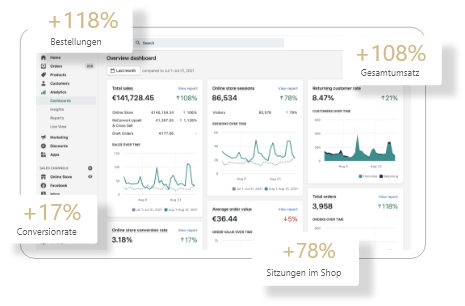
Since its foundation, 600,000 businesses have already benefited from the Shopify e-commerce platform. Turnover has also almost doubled every year since 2015, reaching US$4.6 million in 2021.
This makes Shopify arguably the world’s largest e-commerce platform, but what makes it so successful?
Shopify is a website builder that specialises in creating online shops. The concept is simple: setting up an online shop should be straightforward, yet complex enough to ensure a professional online presence.
Unnecessarily complex processes, such as web hosting or domain names, can be obtained directly from Shopify, which is why Shopify has earned the reputation of being an all-inclusive shop system.
The platform’s high technical standards ensure that downtime is extremely rare. The platform is also well equipped to handle high volumes of traffic.
At the same time, the developers ensure that automatic updates and backups are carried out on an ongoing basis, without users even noticing. Should anything ever go wrong, support is available in all major languages.
Designing your own shop couldn’t be simpler. Almost all elements of the website can be moved into the right place using drag-and-drop. So no coding knowledge is required.
Anyone who still wishes to incorporate HTML or CSS can, of course, do so.
Also helpful is the collection of different Shopify themes – that is, design templates created by professional designers. These can be easily adopted and customised to suit your personal taste.
This makes it very easy to choose a design optimised for conversion rates and adapt it to the brand identity. So you don’t necessarily need a web design agency.
Thanks to the point-of-sale system, even high-street shops can be easily linked to Shopify so that their stock is also available online.
The Shopify POS system helps with centralised stock management, thereby providing greater clarity for traditional shops. In addition, Stocky for Shopify makes it easy to carry out stock-takes.
Of course, Shopify supports all standard payment methods and delivery options.
Shopify also offers all the features you need for SEO to optimise your site for search engines. This makes it relatively easy to set up a Shopify blog to rank for important keywords.
In addition, there are over 2,000 apps and tools available to help you customise Shopify to suit your individual needs.
Of course, it is possible to categorise your products on the platform, as well as to collect customer reviews and display them on the site.
Anyone familiar with e-commerce knows that statistics and data are absolutely essential, which is why all statistics can be viewed and downloaded on Shopify.
In a nutshell: Shopify enables retailers to sell their products online quickly and easily.
Now that you know what Shopify has to offer, you need to decide whether it’s worth setting up your online shop with Shopify.
Essentially, the platform is worthwhile for all small and medium-sized enterprises that wish to sell a product online. It does not matter whether the product is digital or physical.
But of course there are alternatives to Shopify, and even the largest e-commerce platform has its drawbacks.
Of course, the cost of running an online shop is a factor. Shopify is one of the more expensive options in this regard. Unlike its competitors, Shopify does not offer an open-source option.
A monthly fee must be paid to use the platform; we’ll explain exactly how much this is later in the article.
In addition, there are fees, which vary depending on the payment method.
The focus on user-friendliness and ease of use means that the backend is less flexible. This should not pose a real problem for most people, but if technically complex features need to be integrated into the shop, Shopify quickly reaches its limits.
The situation is similar when it comes to Shopify’s speed; whilst it is consistently good, even experienced developers cannot optimise it any further to set it apart from the competition.
The checkout page is a crucial part of ensuring a smooth purchasing process; if it fails to meet shoppers’ expectations, valuable customers will be lost.
That is why it is frustrating that the checkout page in the Shopify store is not linked to the theme and therefore cannot be customised.
Consequently, this may lead to a loss of customers and, consequently, a decline in the conversion rate.
For the sake of completeness, we have summarised the key benefits here once again in a concise manner.
One of the main selling points of the shop system. Thanks to its modular design, anyone can set up a shop. This simplicity means that even businesses on a tight budget can start selling their products online in no time at all.
Nowadays, most interactions with the internet take place on smartphones. Thanks to their responsive design, shops built on Shopify offer a high level of user-friendliness on both desktop computers and smartphones.
Not everyone wants to have their online shop run by an agency all the time. Whether it’s minor tweaks or major structural changes, you can easily carry out both yourself after a short learning curve, if you wish.
Shopify’s costs vary significantly depending on the subscription plan you choose, with each package offering different features. It’s important to know exactly what you need so that you don’t end up paying too much.
If you’re just starting out with Shopify, you’ll have 14 days to try out the platform. During this time, the platform is free to use, but you won’t be able to sell anything yet.
The trial version is mainly intended to help you see whether you can get to grips with the shop system’s interface and what your website will look like in the live version.
After that, you’ll need to choose one of four versions.
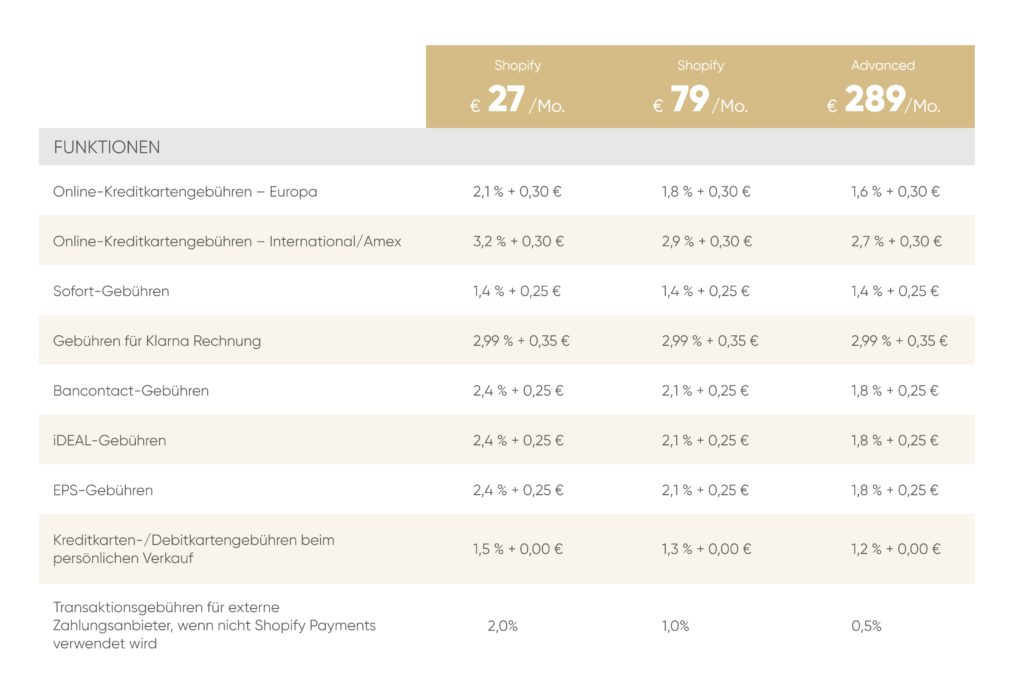
Shopify has listed its prices for the various plans in a Shopify price list and clearly set out their features.
Furthermore, there is the option of paying the fee annually or every two years, thereby reducing the costs by 10 per cent or 20 per cent respectively.
So, if the online shop is to survive in the long term, it makes financial sense to pay for the first two years up front. Anyone who wants to remain flexible will have to accept the higher costs.
On top of that, there are transaction fees ranging from 0.5 per cent to 2 per cent, as well as payment gateway and credit card fees.
Fortunately, these costs only arise once you start generating your first sales; however, they do reduce your profit margins and must therefore be taken into account.
We’ve set out the Shopify costs in more detail in a separate article. In that article, we’ll also show you which plan is best for you and provide a free running-cost calculator for you to download.
You may have heard of Shopify Partners before, but aren’t quite sure what they’re all about. Here’s a brief overview.
The Shopify Partner Programme is for people who actively work with Shopify; there are four categories.
As a shop owner, you can get help from a Shopify Partner to optimise your shop.
In return, Shopify Partners receive support from Shopify, as well as free training resources.
Through this approach, Shopify ensures that everyone receives the support they need to succeed within the Shopify ecosystem.
Golden Web Age is also an Official Shopify Partner. This means we can offer marketing strategies and web development tailored specifically to Shopify shops.
If you’re thinking about setting up an e-commerce shop, you should, of course, compare the available platforms to find out which provider best suits your needs.
We have compared the Shopify, WooCommerce and Shopware platforms and identified their optimal use cases.
In summary, Shopify is the best platform for small and medium-sized businesses looking to get started in online retail quickly and easily.
Now that you know the pros and cons of Shopify, we’d like to give you a brief overview of the basic features you’ll need to set up a fully functional online shop.
The first step is to sign up to Shopify. Simply click on ‘Try for free’ to get started straight away. If you’ve never used the platform before, you’ll even get a 14-day free trial.
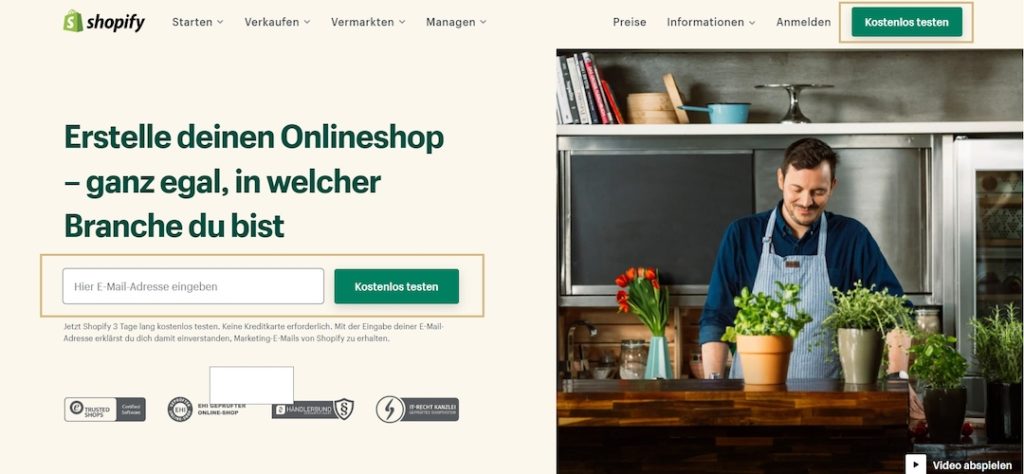
Shopify will then ask you a few questions to tailor the user interface to your needs. Once you’ve filled everything in correctly, you’re ready for the second step.
You are now back in the Shopify dashboard. The dashboard is your control centre; its user interface provides all the features you need to set up your shop.
On the left-hand side, you’ll find the menu, which you can use to navigate to the individual sub-sections. Here are the sections:
As well as their sub-items.
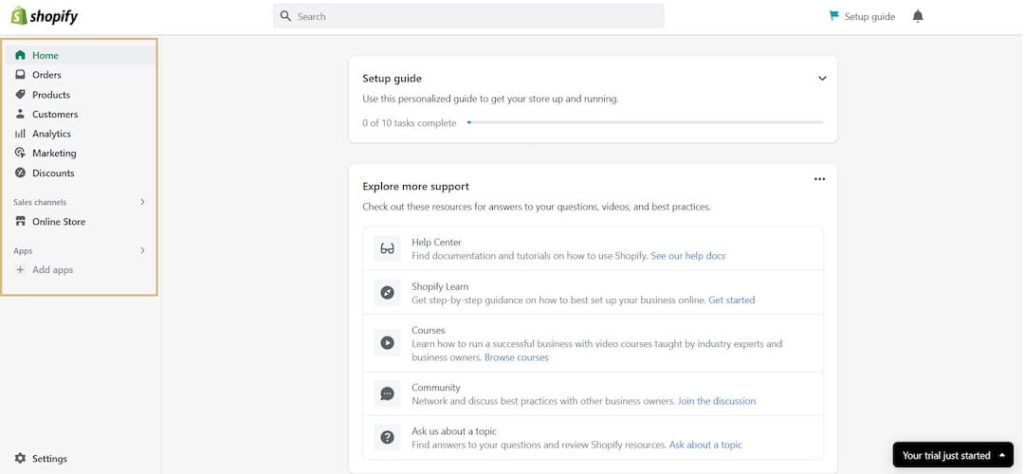
The free trial version includes all the features you need to set up your shop; however, you cannot go live and start selling with it just yet. The trial period is therefore only intended for setting up the site and testing the user interface.
Of course, Shopify also has its own step-by-step guide that interactively shows new users how to use Shopify properly.
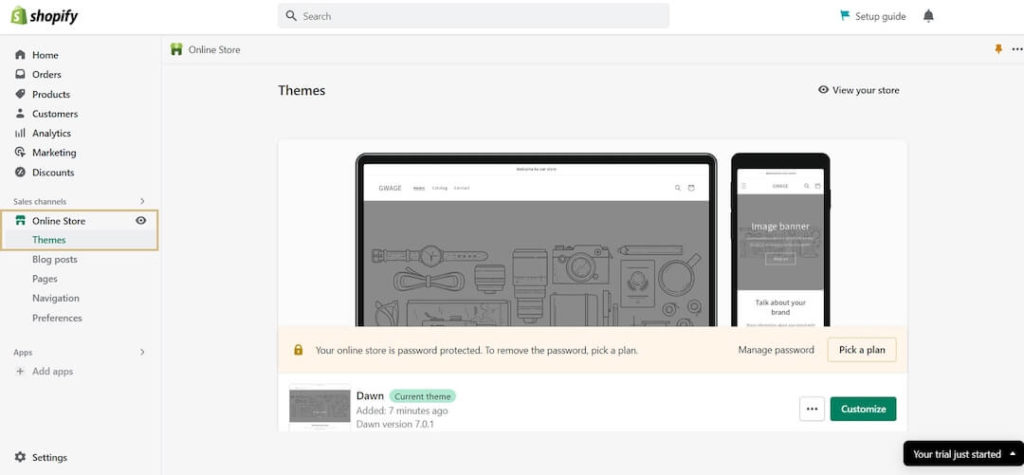
The theme library offers a wide selection of free and paid themes for your shop. Once you’ve found a suitable design, you can add it to your theme library and customise it to suit your needs.
Premium themes here usually cost between 50 and 150 USD and often come with additional features that the free designs do not offer.
The design of an online shop is a very important consideration. If you have no experience with usability, you can largely leave the chosen Shopify theme as it is.
However, one thing that absolutely must be customised is the colour scheme. Add the colours from your brand identity to the theme. I’m sure you’ve got a logo as well. You can add that too.
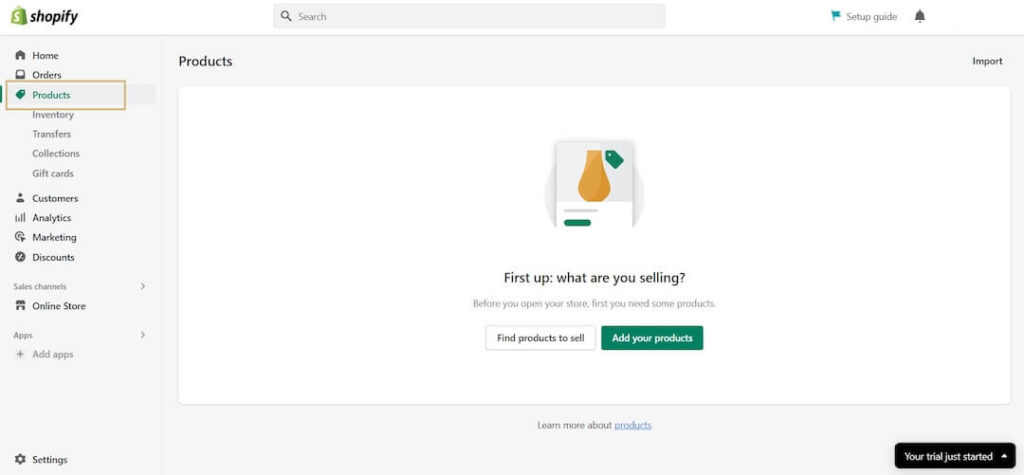
You can access the product page via the menu, where you can add new products. You’ll need to enter the relevant details there, such as the title, description and price.
The data required depends on the product category. However, it is not just the required information that should be provided, but everything that motivates the customer to make a purchase. That is why high-quality media are, of course, also essential.
When adding a new product, it is important to ensure that the relevant sales channel is enabled. This ensures that the product is displayed in the correct shop.
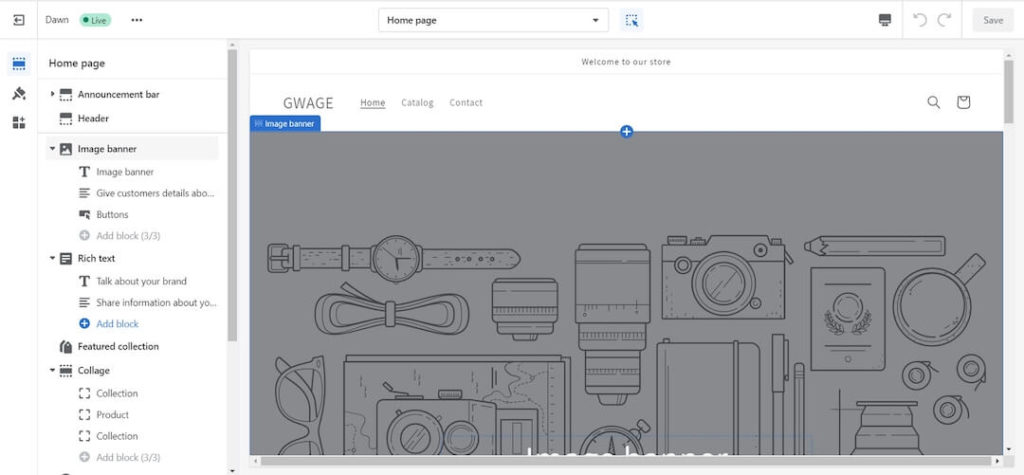
Now it’s time to set up your shop. Thanks to Shopify’s modular system, it’s child’s play. You can use drag-and-drop in the left-hand sidebar to change the order of the individual sections.
Clicking on a section opens its settings panel. Here, each section can be customised individually.
Shopify comes with its own range of free images that you can use. However, ‘unique’ images – that is, images created specifically for your brand – are, of course, better.
The basic framework of your shop is in place and you’re finally ready to launch it? Setting up a website can be complex, so to make sure you don’t forget anything, we’ve put together a checklist for you to ensure your Shopify shop is ready for launch.
If you want to have an online presence, you need a domain name. It is just as important that the domain name inspires confidence. After all, only with a professional-looking web address will customers be willing to spend their hard-earned money in your shop.
There are three options here:
We particularly recommend the latter method to you.
As well as your homepage, your Shopify landing pages and product pages, under German law you also need a number of other pages, including:
Every website requires a legal notice; this must be easily accessible and always available. The standard practice is to link to all mandatory pages in the footer of your website. The legal notice must provide users with all the key information about the company.
For users and in legal matters, the legal notice is the first point of contact for getting in touch with the website operator.
A privacy policy is also required by law. A website must inform users about how it handles personal data.
Although it is not strictly necessary to have Terms and Conditions on your website, it is still advisable to have Terms and Conditions tailored to your Shopify shop.
Where terms and conditions are not explicitly set out, the relevant provisions of the BGB (German Civil Code) shall apply.
In all cases, you should have these documents drawn up individually by a solicitor to ensure full legal certainty. However, there are other methods available: tools that automatically generate the required documents for you. These are not legally watertight, however, and we cannot therefore recommend them.
Social media is an indispensable marketing channel these days. So there’s a good chance that you, too, will want to use social media to raise awareness of your brand.
In that case, you should definitely link the relevant social media channels to your website so that you can make the most of them.
How can you do this? Simply go to the ‘Social Media’ section in the theme settings.
Under EU law, it has been decided that website users must first accept non-essential cookies before these may be used.
As tracking is essential in e-commerce, you’ll also need a GDPR-compliant cookie tool.
To set up a Shopify cookie banner free of charge, we recommend Consentmo’s GDPR/CCPA + Cookie Management Tool.
However, with the free version, you won’t be able to customise the design.
An important step in Shopify SEO is optimising the title and meta description of your shop pages. This is where you determine what Google displays in search results for your keywords.
These should be neither too short nor too long. Not too short, because otherwise you’ll be wasting valuable ad space, and not too long, because otherwise Google won’t be able to display the entire text.
Sistrix’s Snippet Tool is the best way to optimise your meta data. It shows you the exact length of your meta data, even down to the pixel. This allows you to create titles and meta descriptions of the perfect length.
Nowadays, an online shop naturally needs to offer all the standard payment methods. If a customer cannot find their preferred payment method on the checkout page, they are likely to abandon the purchase. This is a frustrating and avoidable situation.
That’s why Shopify Payments offers a simple way to add a whole range of payment methods to your shop.
The main payment methods in Germany are: credit card, Klarna Sofort, Klarna invoice and PayPal.
This way, you can ensure that almost all customers will find their preferred payment method in your shop.
As already mentioned, e-commerce simply wouldn’t work without data. Only with the right information can you decide whether a campaign will be successful or whether you’ll lose money.
That is why a professionally configured Google Analytics and Google Search Console setup is essential.
Unfortunately, data protection regulations are making it increasingly difficult to set up these tools in a way that complies with data protection rules. Google has responded to this by launching GA4 (Google Analytics 4).
Click on the link to find out how to remove the ‘Powered by Shopify’ text.
Have you ticked off all the checkpoints on the list? Congratulations – your Shopify shop is now ready to launch. Did something go wrong? Don’t worry – we’re happy to help you set up your Shopify online shop in the best possible way and scale it as you go.
Once the foundations are in place, you’ll be ready to scale your shop as you see fit and boost your turnover.
As a Shopify agency, we specialise in boosting your sales through performance marketing. If you’d like to find out how this works or have any other questions, please feel free to book a no-obligation consultation with us.
Want to find out more? In our comprehensive guide, you’ll find everything you need to know about setup, design, marketing, checkout, SEO and scaling with Shopify.
To set up a Shopify shop, visit the Shopify website and sign in to create a Shopify account. Follow the instructions to set up a shop and choose a suitable theme from the Shopify Theme Store.
The cost of setting up a Shopify shop varies depending on the pricing plan you choose. Shopify offers a range of pricing plans, each with different features and services. You can also try out the platform for free during the trial period.
To add products, go to the ‘Products’ section in your Shopify admin. There, you can create new products, set their details and add images. Make sure you set up the correct payment methods in Shopify.
Yes, Shopify offers the option to try out a shop for free. You can sign up and explore the platform’s features during the trial period to see if it meets your needs.
The checkout process in Shopify is designed to be user-friendly. Customers can add items to their basket and enter their payment details. Shopify Checkout offers several payment methods, including credit cards and PayPal, to make the shopping experience as straightforward as possible.
To set up shipping for your Shopify shop, go to the Shipping and Delivery options in your Shopify Admin. Here, you can define shipping rates, zones and methods that are suitable for your online shop.
You can choose a theme for your Shopify shop from the Shopify Theme Store. There are plenty of free and paid themes that you can customise to suit your needs and create a unique shop.